Unleashing the Power of Tick2Trade's Strategy Builder: Create Winning Strategies Step-by-Step
Most options mistakes happen before the trade is placed: the wrong strikes, a payoff the trader didn't fully understand, or a margin requirement that turns out to be far larger than expected. An options strategy builder lets you assemble a multi-leg position, see exactly how it pays off and what it risks, and only then place it. This guide shows how to use Tick2Trade's strategy builder step by step, with a worked example.
Step 1: Start from your market view
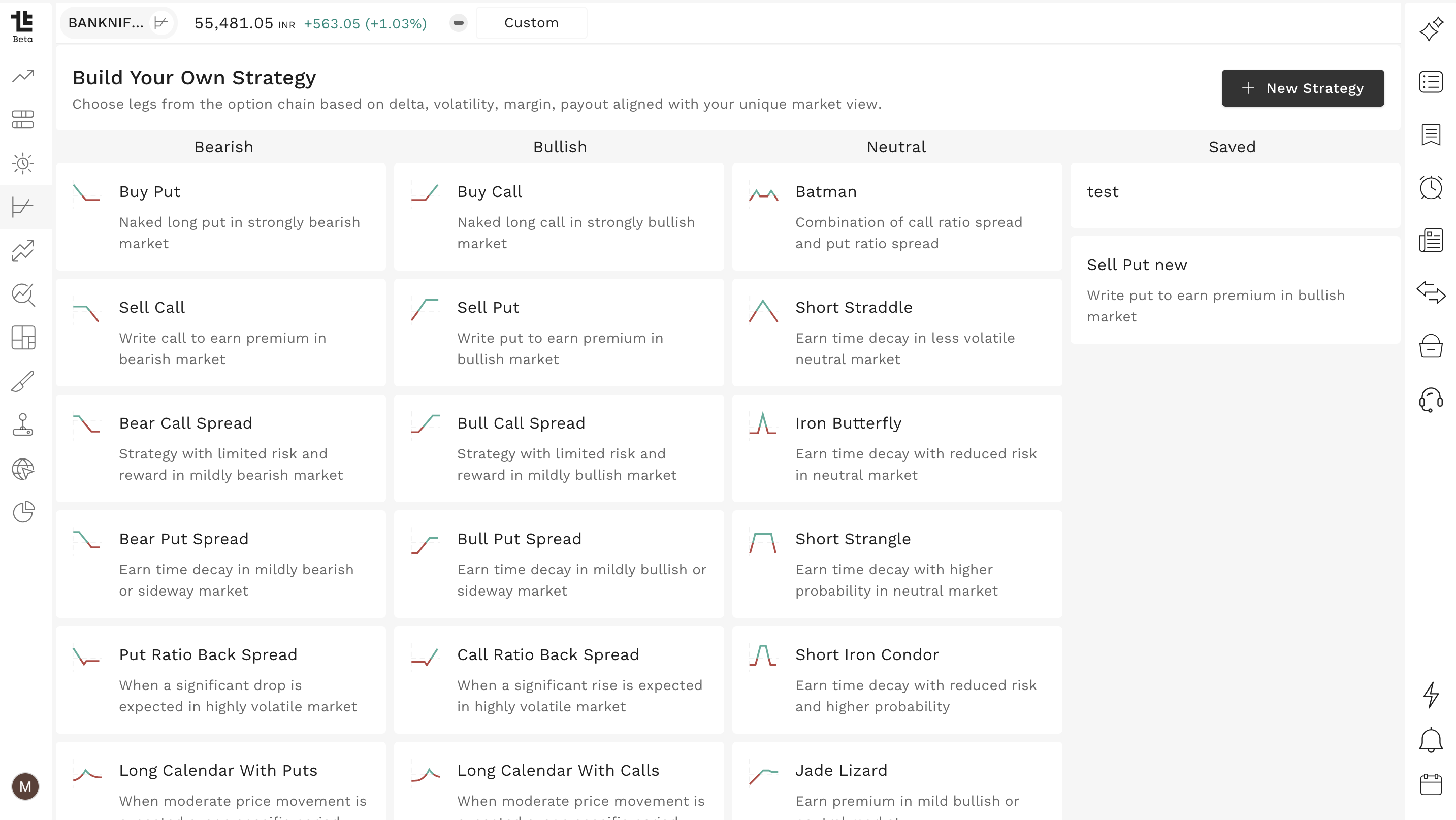
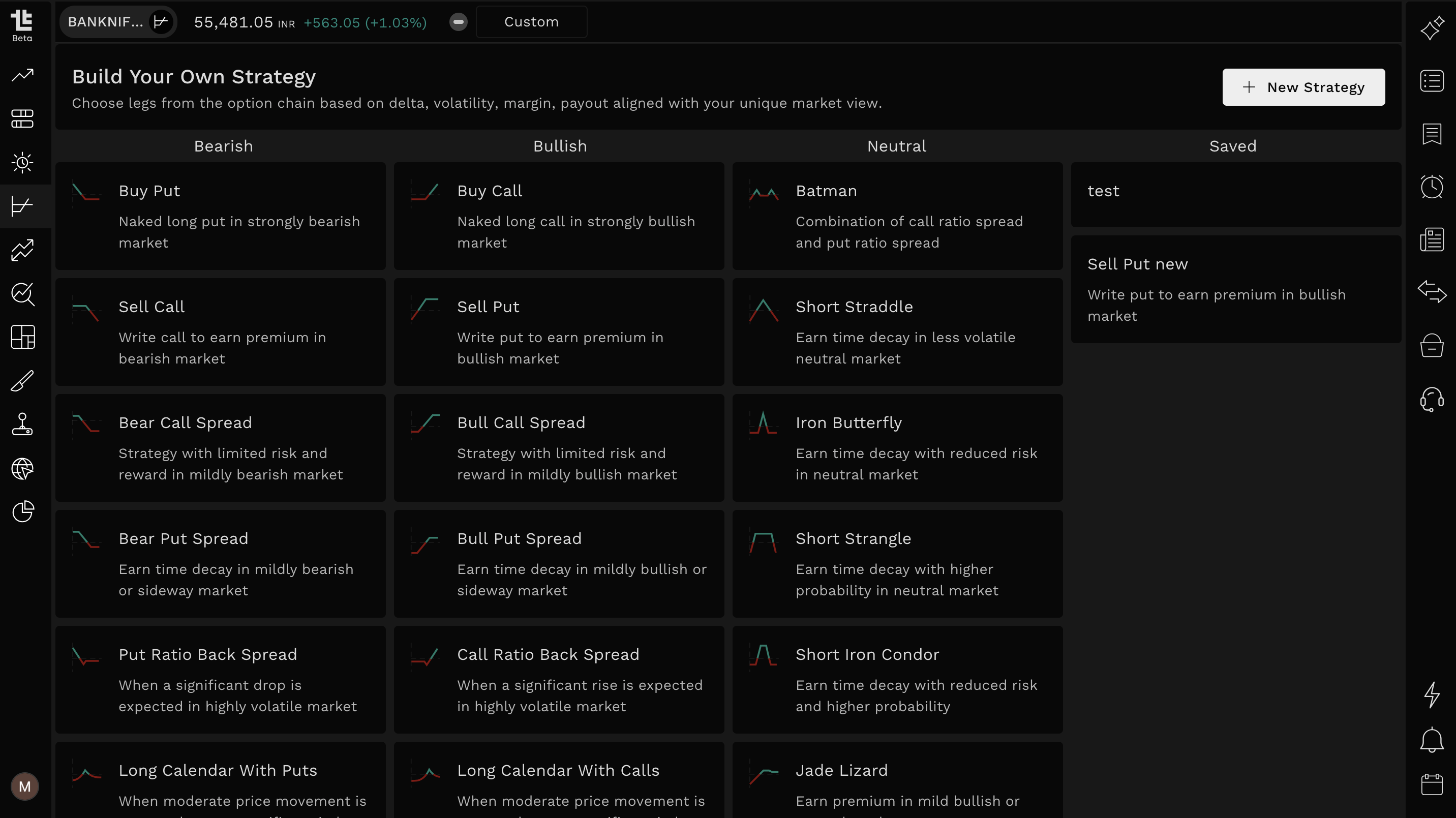
Every strategy starts with a view on direction and volatility. The strategy builder groups ready-made templates by view, so you can start from the outcome you expect:
- Bullish: Buy Call, Sell Put, Bull Call Spread, Bull Put Spread, Call Ratio Back Spread, Long Calendar with Calls
- Bearish: Buy Put, Sell Call, Bear Call Spread, Bear Put Spread, Put Ratio Back Spread, Long Calendar with Puts
- Neutral: Short Straddle, Short Strangle, Iron Butterfly, Short Iron Condor, Batman, Jade Lizard
Each template shows a one-line description of when it fits, for example "earn time decay with reduced risk in a neutral market" for the iron butterfly.
Step 2: Pick strikes, or build your own
Choosing a template fills in the legs automatically around the current price. Strikes can be selected by ATM distance, by delta or by premium. You can also build a custom strategy from scratch:
- Click strikes in the option chain to add them as legs.
- Click on the payoff graph to add a call or put at that level, and drag strikes to reshape the payoff.
- Change the expiry, buy/sell side, option type and quantity of any leg.
Step 3: Read the payoff and the risk numbers
The payoff graph shows profit or loss across a range of underlying prices:
- Expiry P&L: the result if you hold until expiry.
- Target-day P&L: the estimated result on a date before expiry, which matters because most traders exit early.
- Breakevens: the underlying prices where the position neither makes nor loses money.
Alongside the graph you see max profit, max loss, required margin, the position's Greeks and its probability of profit. If max loss reads "unlimited" or the margin is more than you planned, this is the moment to change the structure, not after the order is filled.
Step 4: Run what-if scenarios
Adjust spot price, implied volatility and days to expiry to see how the position would behave. Two scenarios are worth checking every time:
- A sharp move to either side of your breakevens.
- A fall in IV, which matters for any position bought ahead of an event. Read more in our guide to implied volatility and IV crush.
Step 5: Adjust quickly
Quick controls let you shift all expiries together, move all strikes up or down, scale quantities proportionally and flip buys and sells, so testing a variation takes seconds rather than rebuilding the strategy leg by leg.
Step 6: Place and manage the trade
When the structure looks right, place all legs together from the trade panel. After entry you can:
- Track the whole position as a single price series on the strategy chart.
- Set a stop-loss and target for the basket as a whole, including a trailing stop.
- Set conditional entry and exit rules, so the platform can act on your plan while you stay in control of it.
Worked example: a range-bound view on NIFTY
Suppose NIFTY is at 25,000 and you expect it to stay in a range until expiry.
Option A: short straddle
Sell the 25,000 call and the 25,000 put. Assume they bring in a combined premium of 300 points.
- Maximum profit: 300 points per unit, if NIFTY expires exactly at 25,000.
- Breakevens: 24,700 and 25,300.
- Maximum loss: unlimited on both sides, and the margin requirement is high.
Option B: iron butterfly
Do the same, but also buy the 24,600 put and the 25,400 call as protection. Assume the two wings cost 80 points.
- Net credit: 300 − 80 = 220 points per unit.
- Breakevens: 24,780 and 25,220.
- Maximum loss: 400 − 220 = 180 points per unit, and the margin requirement is much lower.
The iron butterfly gives up some profit and has a narrower profit zone, in exchange for a capped loss. The strategy builder shows both versions side by side in seconds, so you can choose with the full risk in front of you. (Premiums here are illustrative; check live prices before trading.)
How Tick2Trade's strategy builder is different
- Built into a broker's terminal. Tick2Trade is a SEBI-registered broker's own platform, so the strategy you design is the order you place, with every leg sent together and no copying strikes from an analytics site into a trading app.
- Design by dragging the payoff. Add legs by clicking on the payoff graph and reshape the strategy by dragging strikes, not just by editing a table.
- Risk before reward. Margin, max loss, Greeks, breakevens and probability of profit update live as you change any leg.
- Automation with you in the loop. Basket-level stop-losses, targets, trailing stops and conditional entry and exit rules let the platform act on your plan, while you decide what the plan is.
- Connected to the rest of your workflow. The builder links to the option chain, the strategy chart and order management in the same terminal.
See the full feature list on the strategy builder page.
Risk disclosure: Trading in futures and options involves substantial risk. SEBI studies have found that about 9 out of 10 individual F&O traders incurred net losses. This article is for education only and is not investment advice. Tick2Trade is a brand of Besseggen InfoTech LLP, SEBI Reg. No. INZ000213450.