Trade at lightning speed.
Professional scalping terminal designed for speed. Multiple charts in one view, one-click execution, predefined layouts, and saved configurations — everything you need to scalp like a pro.
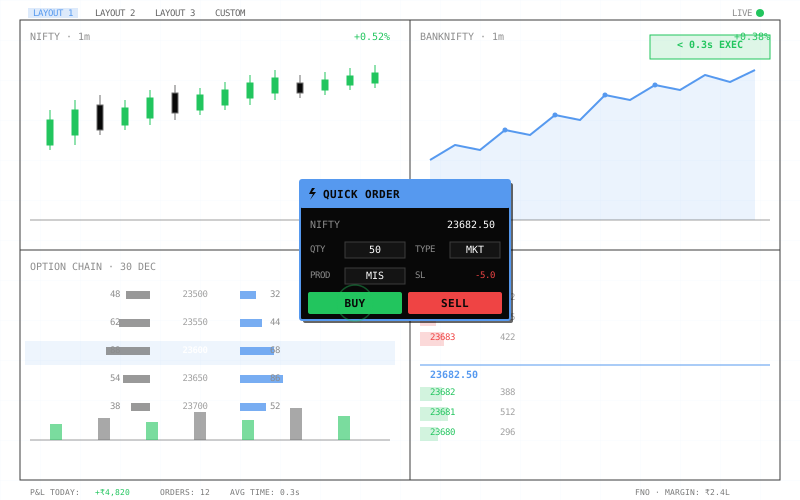
Everything in one view.
Monitor multiple charts, option chains, order depth, and positions simultaneously in a single customizable layout. No more switching tabs or missing opportunities while you hunt for information.
Multi-Chart Grid Layout
Display 2, 4, 6, or 9 charts in a single screen. Each chart can show different symbols, timeframes, or indicators. Track NIFTY, BANKNIFTY, and stocks simultaneously without losing context.
Mix Chart Types & Widgets
Combine candlestick charts, line charts, option chains, order books, and position trackers in one layout. Build your perfect trading workspace.
Custom Layout Builder
Drag, resize, and arrange widgets exactly how you want them. Save your custom layout for quick access every time you trade.
One click, trade done.
Quick Order mode and saved configurations eliminate every extra click. Place trades in less than a second with keyboard shortcuts. When milliseconds matter, speed is everything.
Instant Execution with Quick Order
Execute trades instantly with keyboard shortcuts. No forms, no confirmations, no delays. Pre-configured order panel with saved settings for maximum speed.
Quick Order Features:
- •Keyboard shortcuts: Shift + B for Buy, Shift + S for Sell
- •Auto-fills from current chart symbol
Saved Configuration:
Save your trade setup with quantity, product type, and quantity multiplier. Execute your saved configuration with one click.
- •Includes: quantity, product type, qty multiplier
- •Save one configuration for quick access
Average execution time
From seeing opportunity to order placed: less than a second. That's 10x faster than traditional order windows.
Built for performance.
- • Support for 2, 4, 6, or 9 widgets per layout
- • Mix charts, option chains, order books, positions
- • Drag-and-drop widget arrangement
- • 5+ predefined professional layouts
- • Unlimited custom layout saving
- • Floating Quick Order panel (F1 hotkey)
- • One-click BUY/SELL execution
- • Less than a second average execution time
- • Auto-fill from current chart symbol
- • No confirmation dialogs (optional safety toggle)
- • Save unlimited order configurations
- • Config includes: qty, product type, SL, target
- • One-click deployment of saved setups
- • Bracket order automation
- • Trailing SL support in configs
- • F1: Quick Order | F2: Buy | F3: Sell
- • F4: Exit All | F5: Square Off Position
- • Ctrl+1-9: Switch layouts
- • Custom hotkey mapping
- • Mouse-free trading workflow
- • Candlestick, line, area, Heikin-Ashi charts
- • Real-time option chain widget
- • Order book depth display
- • Live positions & P&L tracker
- • Market depth (Level 2) widget
- • Handles 9 real-time widgets simultaneously
- • Zero-lag chart updates
- • < 100ms order placement latency
- • Optimized for high-frequency scalping
- • Minimal CPU/memory footprint
Ready to trade faster?
Professional scalping terminal with multi-chart layouts, one-click execution, and saved configurations. Execute trades in less than a second.