How to Build a Smart Watchlist on Tick2Trade to Track Stocks, Indices, and Options
A watchlist is the home screen of a trader's day. A cluttered one hides opportunities; a well-organised one shows you exactly what is moving and what needs attention. Tick2Trade watchlists go beyond a simple list of stocks, letting you track indices, futures and options side by side, grouped the way you think about the market.
Opening your watchlist
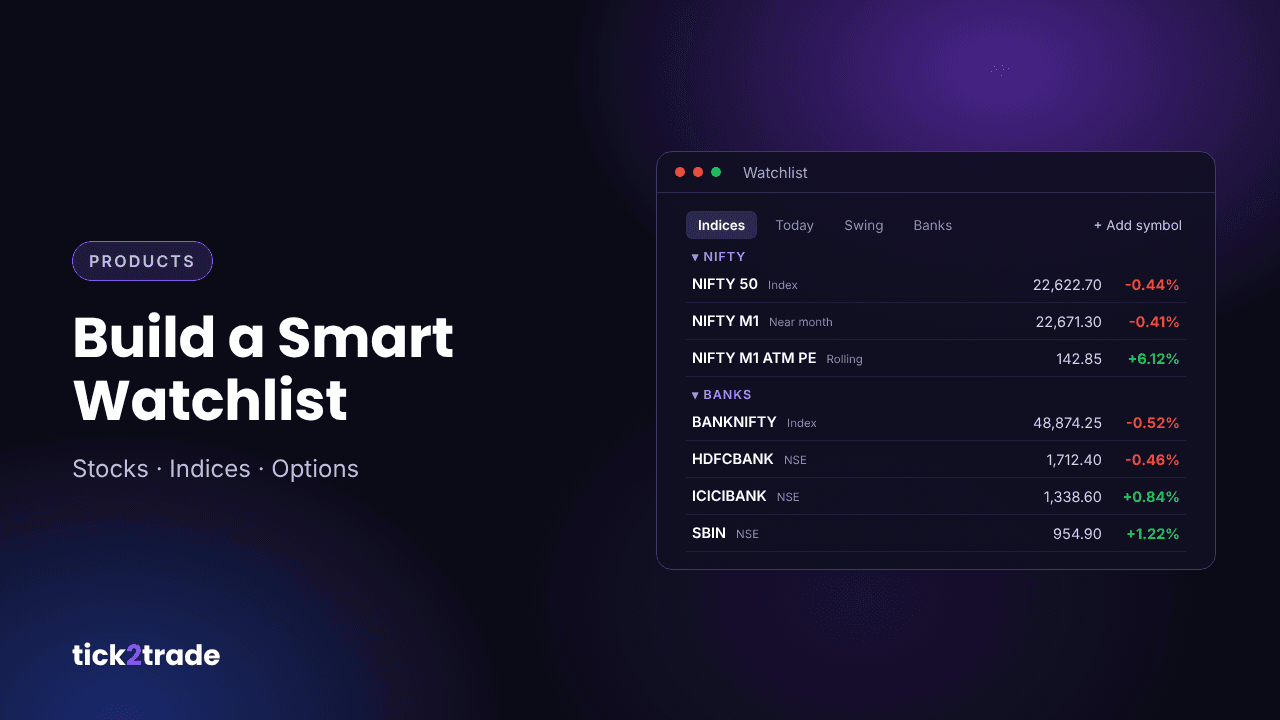
Open the Watchlist panel from the right-hand toolbar. Each row shows the symbol, last price, change and change %. Click any symbol to load it on your chart instantly.
Use multiple watchlists
Instead of one long list, create several focused watchlists and switch between them using the tabs at the bottom of the panel. A simple structure many traders use:
- Indices – NIFTY, BANKNIFTY, FINNIFTY, SENSEX.
- Today's trades – candidates from your morning screener scans.
- Swing positions – stocks you are holding for several days.
- Sector leaders – banking, IT, auto and pharma heavyweights.
Organise with sections
Within a watchlist, add sections to group related symbols. For example, a "Nifty" section can hold the index, its near-month future and key ATM options, while a "Banks" section holds HDFCBANK, ICICIBANK and AXISBANK. Collapsible sections keep a long list readable.
Track rolling futures and ATM options
One of the most useful features is support for rolling symbols such as near-month continuous futures (for example NIFTY M1) and relative ATM options (for example NIFTY M1 ATM PE). These automatically point to the current contract, so you do not have to rebuild your watchlist every expiry.
Add symbols quickly
Use + Add symbol at the bottom of a list, or the add button at the top of the panel, to search for and add stocks, indices, futures or option contracts.
A daily watchlist routine
- Pre-market: review index levels and update today's trades list from your screener.
- Open: sort by change % to spot early leaders and laggards.
- During the session: set alerts on key levels for symbols on your list.
- Post-market: remove stocks that no longer fit your setup and note any for tomorrow.
Common watchlist mistakes
- Keeping 100+ symbols you never actually look at.
- Mixing long-term investments and intraday trades in one list.
- Never pruning the list, so stale ideas crowd out new ones.
Try it on Tick2Trade
A focused watchlist, paired with charts and alerts, keeps your attention on what matters. Open the Tick2Trade chart terminal and set up your first watchlists today.
Disclaimer: This article is for educational purposes only and is not investment advice. Trading in securities and derivatives involves risk.